
Adding keypoints 回答済み

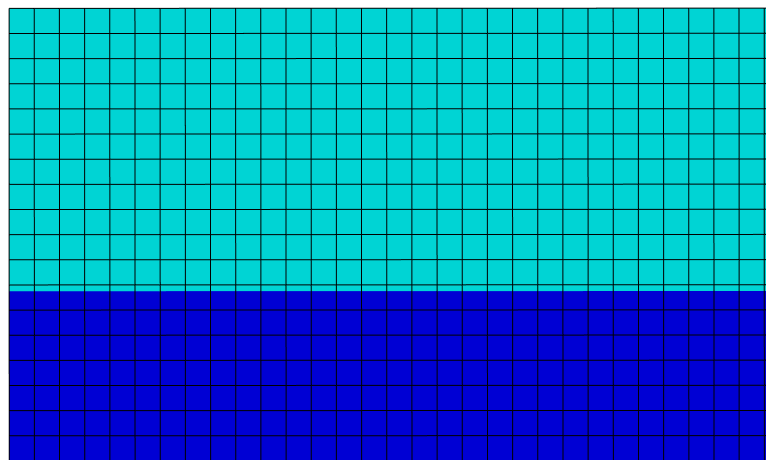
How to add keypoints in this model (a rectangle overlying an other rectangle). The program said that can not add keypoints on boundaries.
japan-support
How to add keypoints in this model (a rectangle overlying an other rectangle). The program said that can not add keypoints on boundaries.
4件のコメント
Hi Dutcho Le,
If you are doing this in Designer mode you can't define keypoints on the boundaries, designer uses the model extents to define a begin and end X and Y keypoint automatically.
You can define a new keypoints anywhere within the model extents. Using your image the only keypoint that I personally would need to define in designer is shown with the yellow line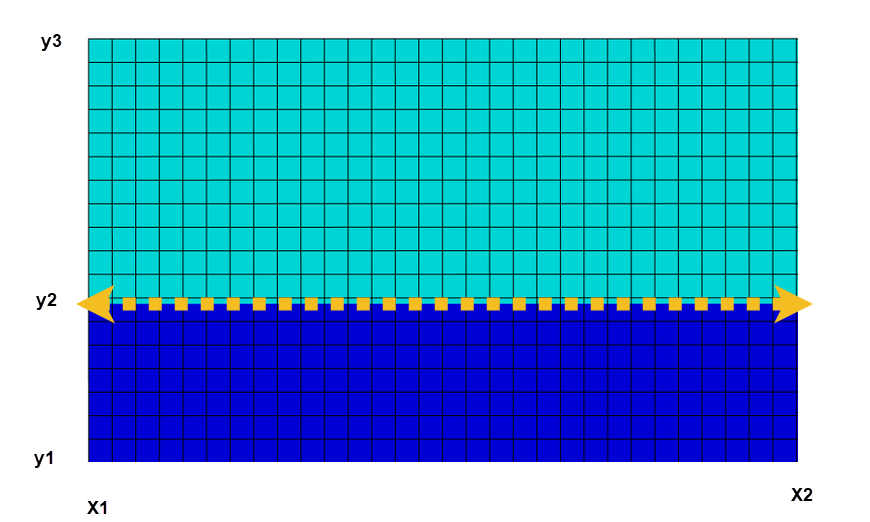
Regards,
Oliver
Hi Oliver,
Thanks for your respond. I have successfully added key points to my model using extent option in model tree. As you said, I only add the key point at the interface of two rectangle but nothing happened, the mesh does not change any thing at all. So do I miss some things?
Best,
Ductho
Hey,
So the designer UI shows an approximate meshing and doesn't take into account keypoint locations when showing the mesh.
I output a flxdato file and opened the model in the post processor this is what the mesh actually looks like.
As you can see there is no overlap.
Best regards,
Oliver
Great to know that.
Thanks Oliver
サインインしてコメントを残してください。
お探しのものを見つけられませんでしたか?
新規投稿