
PZT Disc in Load in Analyst Answered

There is a proplem about the Analyst tutorial example,PZT 2D disc,which edited by Kevin July 24 2020.I copied his code and clicked the 'Preview Model' button and tried many times.IN the Debug window,a error message always is there,said error occured in subroutine chkicr and Grid spacing not monotinic.I am a beginner of ONScale so that I am looking for help to deal with it.
4 comments
Hey,
Can you send me the code you are using? Just copy and paste it here.
I checked the tutorial and couldn't find a problem with the code, which leads me to suggest that there is maybe a typo in your code
Best regards,
Oliver
I just copoed the PZT 2d tuirorial code ,and then clicked the Preview Model button. What the debug window said is as the screenshot.AND the original code is as follows:
c
c designer: onscale
c model description: pzt 2d axisymmetric disc
c date: dd/mm/yyyy
c version: 1.0
c
c set model title
titl training pzt 2d disc example
c use all cores
mp omp * *
c do not save restart file
rest no
c geometry
symb water_size = 4e-3 /* dimension of water around transducer
symb pzt_rad = 10e-3 /* pzt radius
symb pzt_thk = 2e-3 /* pzt thickness
symb water_size = 4e-3 /* dimension of water around transducer
symb pzt_rad = 10e-3 /* pzt radius
symb pzt_thk = 2e-3 /* pzt thickness
c frequency and mesh
symb freqint = 1e6 /* frequency of interest
symb freqdamp = $freqint /* set damping frequency to frequency of interest
symb vel = 1500 /* minimum material velocity in model
symb wavelength = $vel / $freqint /* calculate smallest wavelength to disctretise
symb nepw = 15 /* number of elements per wavelength
symb box = $wavelength / $nepw /* calculate element size for meshing
c create x-y-z keypoints to accurately model dimensions
symb #keycord x 1 0.0 $pzt_rad $water_size
symb #get { idx } rootmax x /* store last keypoint indice in variable 'idx'
symb #keycord y 1 0.0 $water_size $pzt_thk $water_size
symb #get { jdx } rootmax y /* store last keypoint indice in variable 'jdx'
c create i-j-k keypoints
symb #keyindx i 1 $idx 1 $box 1 /* calculate number of nodes required in i direction
symb #keyindx j 1 $jdx 1 $box 1 /* calculate number of nodes required in j direction
symb indgrd = $i$idx /* last node number in i direction
symb jndgrd = $j$jdx /* last node number in j direction
c create grid
grid $indgrd $jndgrd axiy /* generate grid of nodes and apply axisymmetric condition to model grid
c map physical geometry to grid of nodes
geom keypnt $idx $jdx /* tie in all xy keypoints (physical dimensions) to ij keypoints(nodes)
c material defintions
symb #read training.prjmat /* materials stored in .prjmat file and read into flex model
c allocate materials to grid
site
regn watr /* assign watr to full grid
regn pmt3 $i1 $i2 $j2 $j3 /* assign material 'pmt3' to grid defined by nodal range end
c plot model
grph
nvew 2 2 /* set up 2 views
plot matr /* plot model
mirr x on /* apply visual symmetry
plot matr /* replot model
end
term /* pause model
c boundary conditions & loading c external boundary conditions
boun
side xmin symm /* assign symmetry condition xmin side of model
side xmax absr /* assign absorbing boundary condition (infinite medium)
side ymin absr /* to xmax ymin and ymax side
side ymax absr
end
c define time varying function
func wvlt $freqint 1. /* wavelet impulse function c piezoelectric loads
symb ascale = 1 /* area scaling for electrode area - required for accurate simulation of impedance amplitude - '1' for axiy model
piez
wndo $i1 $i2 $j2 $j3 /* define electric window to pzt material - minimise for faster model run time
defn top $ascale /* define electrode - name 'top'
node $i1 $i2 $j3 $j3 /* assign nodes for top electrode
defn bot $ascale /* define electrode - name 'bot'
node $i1 $i2 $j2 $j2 /* assign nodes for bottom electrode /* electrical boundary condition
bc top volt func /* apply voltage condition to 'top' electrode and assign driving signal 'func'
bc bot grnd /* apply ground condition to 'bot' electrode
slvr pard /* use pardiso solver - our new faster electrostatic solver for piezo simulations
end
calc
pres aprs /* calculate pressure and acoustic pressure
disp /* calculate displacement
max aprs none pmax /* capture maximum acoustic pressure only and store in 'pmax' array
end
pout
hist func /* time function - array '1'
histname electrode vq all /* voltage and charge data for all electrodes - array '2-5'
hist ydsp $i1 $i1 1 $j3 $j3 1 /* y-displacement at node on the top electrode - array '6'
end
shap
data xdsp /* x displacement data to be extracted with mode shape
data ydsp /* y displacement data to be extracted with mode shape
freq $freqint /* mode shape '1'
end
extr
defn kirc /* define type extrapolation boundary type - kirchoff
ref in $x1 $y2 /* reference point to determine extrapolation vector
node $i1 $indgrd-1 $j3+5 $j3+5 /* extrapolation boundary at the defined nodal indices
driv func /* storing time function to allow tvr calculation in toolkit
end
prcs /* check models, sets up required data arrays, calculates stable timestep for solver to run model
grph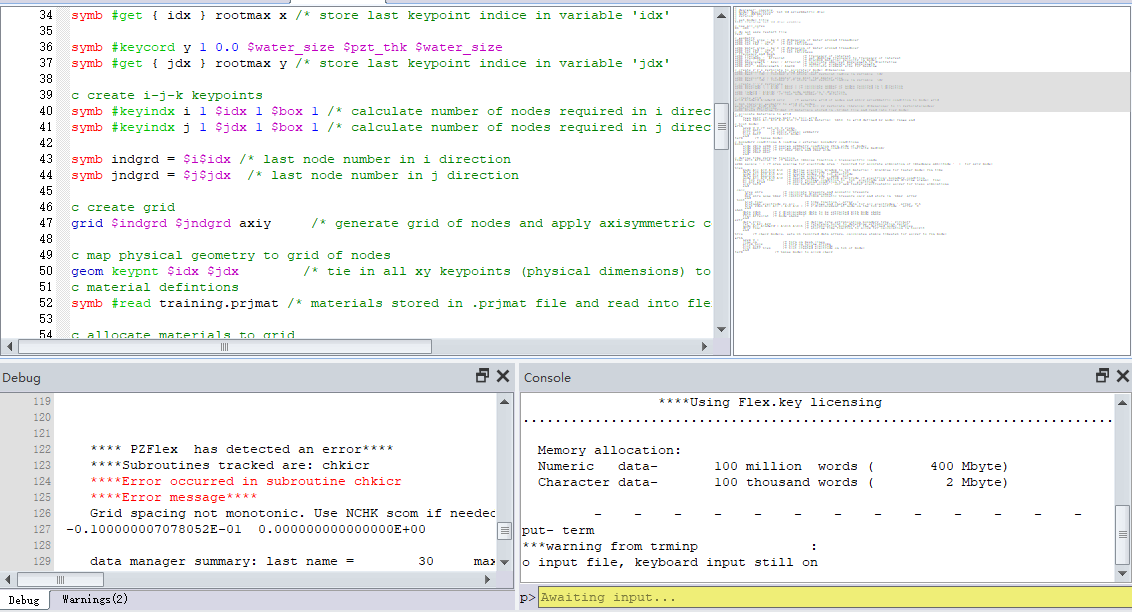
nvew 2 1
line on /* turn on mesh lines
arrow pole /* turn on poling arrows
plot piez /* plot created electrode
plot matr piez /* plot created electrode on top of model
end
term /* pause model to allow check
Hi there,
I have just copied your code and run it without error:
Could you actually share the file via your preferred cloud sharing service (instead of copying and pasting the code) as there many be an issue with your spacing.
Best Regards,
Chloe
Sorry,I don't know how to share the file,could you please tell me,
Best regards
XD
Please sign in to leave a comment.
Didn't find what you were looking for?
New post