
I don't know the cause of the error message. 回答済み

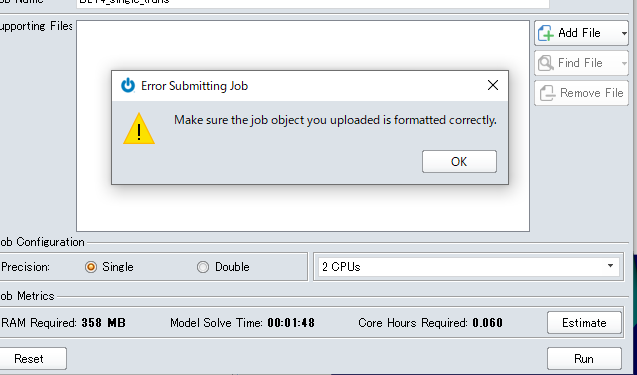
This message appeared when the simulation was performed. Until the previous day, the simulation was normal, and there was no particular change in the settings. What is the cause of the error?
japan-support
This message appeared when the simulation was performed. Until the previous day, the simulation was normal, and there was no particular change in the settings. What is the cause of the error?
6件のコメント
Hi there,
It sounds like you are using the wrong type of file. In Designer mode you must run *.jfp's on the cloud. In Analyst Mode you must run *.flxinp files on the cloud.
Best Regards,
Chloe.
Hi there,
I clicked “Run on Cloud” in the * .jfp opened from the folder and tried to run the simulator, but I got the same error. Does this mean that this is wrong?
Best Regards,
Katsuhito.
Hi,
Make sure are using the latest version of the software.
You can download in the Login Portal or within the application.
Best regards,
Kevin
Hi there,
I tried to update in the application and clicked the blue circle shown in the attached image, but 404 site is displayed. Also, I don't know how to update from the login portal. Can you tell me?
Best Regards,
Katsuhito.
Katsuhito, you should have access to the portal with your login credentials: https://portal.onscale.com
On the left you will see a link to download the latest version.
Hope this helps.
Kevin
Thank you.
The problem was solved.
Best Regards,
Katsuhito.
サインインしてコメントを残してください。
お探しのものを見つけられませんでしたか?
新規投稿